ClickFix: When the User Becomes Part of the Attack
Cybersecurity threats do not always begin with a malicious attachment or an unpatched system. Increasingly, attackers are taking a different approach: convincing users to execute the attack themselves.
This social engineering technique, known as ClickFix, uses familiar prompts and seemingly reasonable instructions to manipulate a user into running malicious code on their device. Abacus cybersecurity experts have observed an increase in ClickFix activity, making awareness particularly important for organizations operating in highly regulated and data-sensitive environments.
How ClickFix Works
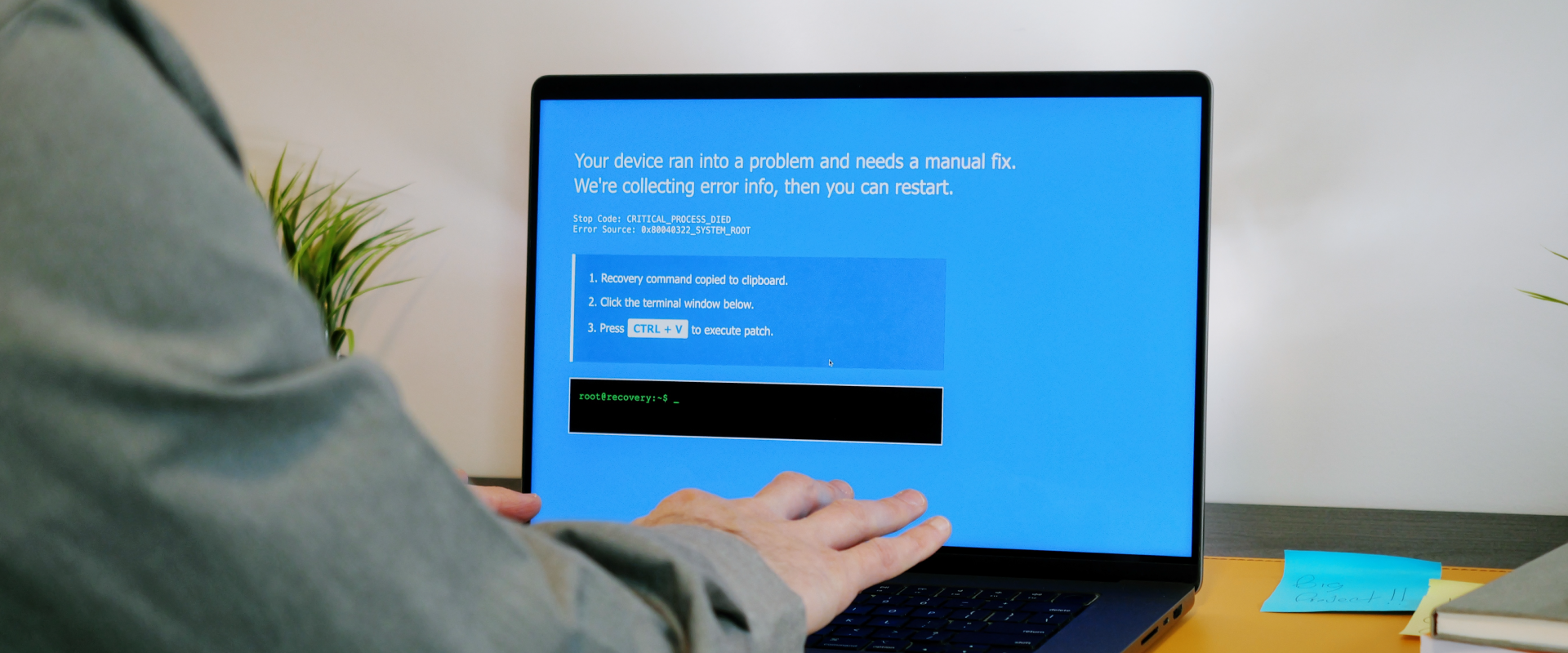
A ClickFix attack often starts with something that looks routine: a CAPTCHA, a browser error or verification page, a software update, a meeting invitation, a document problem, or a technical support message. The page then provides instructions to “fix” the issue. A user may be given instructions and asked to open Windows Run, PowerShell, Windows Terminal or, on a Mac, Terminal, and paste in a command.
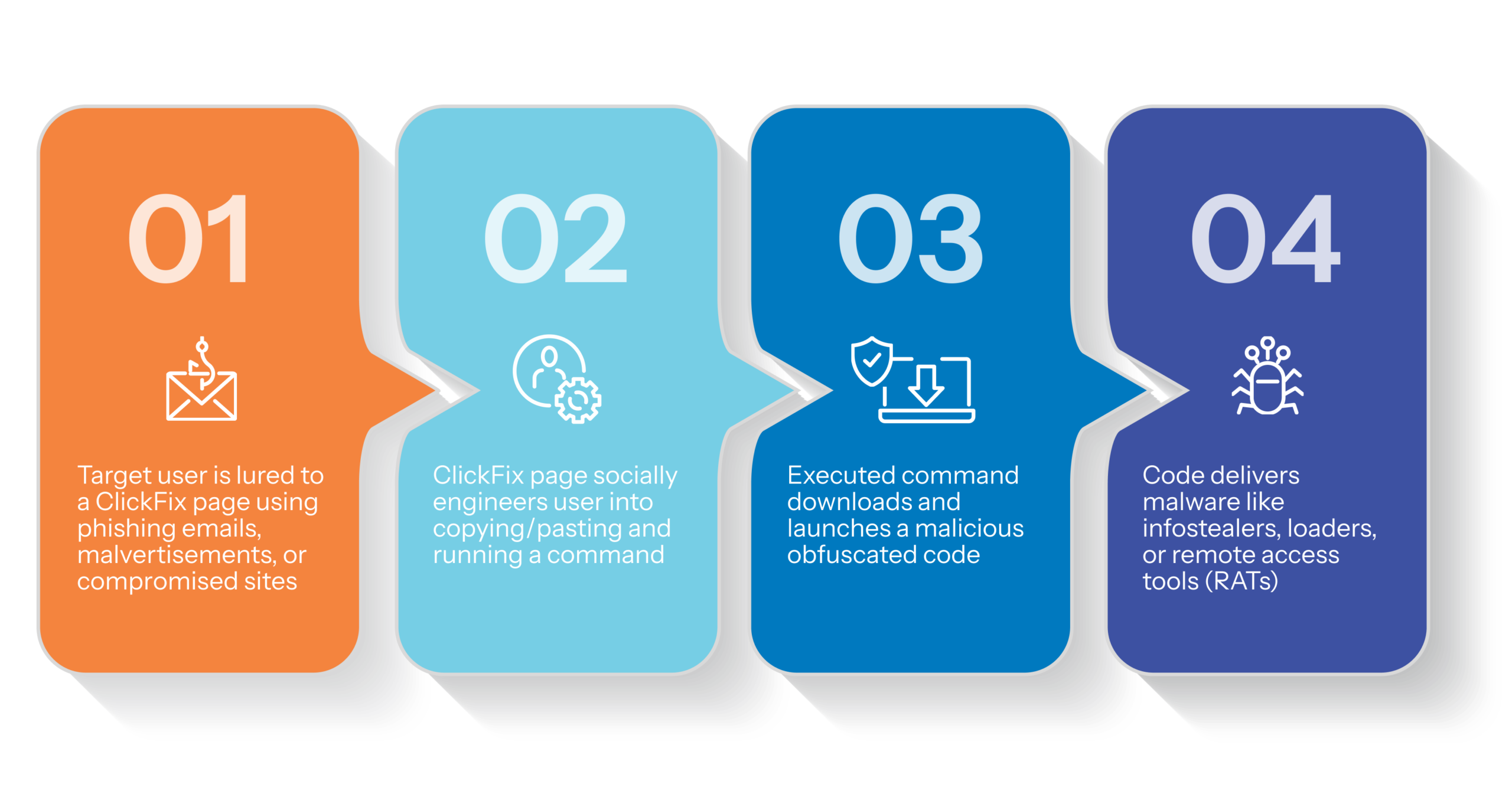
Instead of exploiting a software vulnerability, the attacker is exploiting trust and having a legitimate user execute a legitimate action.
Once executed, the command can download or launch malware and potentially:
- Steal passwords, browser data and authentication tokens
- Provide unauthorized access to business applications or cloud services
- Install remote-access tools or additional malware
- Exfiltrate confidential information, including financial data and electronic patient health information (ePHI)
- Enable further compromise of accounts and systems
The reason that ClickFix is generating so much concern is that the attack hides behind authorized users. Traditional attacks involve an adversary directly delivering or executing something malicious, but with ClickFix, the user is manipulated into initiating the execution themselves. Endpoint detection and antivirus solutions can still identify malicious activity, but the technique changes what security controls need to recognize and stop.
Why Leaders Should Pay Attention
ClickFix is not limited to a particular industry, job function, or level of technical sophistication. Anyone who browses the web, accesses documents, or joins meetings can encounter a convincing prompt.
For financial services and healthcare organizations, the potential consequences are particularly significant. An initially simple interaction could expose credentials, authentication tokens, confidential financial data or PHI, or access to critical business systems, resulting in regulatory consequences and significant business impact.
The scale of the activity also underscores the need for awareness. According to the research provided from the Microsoft 2026 Digital Defense Report, Microsoft Defender observed ClickFix-style attacker-supplied commands executed on more than 1.1 million unique devices between February and early May 2026.
Recognizing a ClickFix Attempt
The clearest warning sign is simple: a legitimate website should not require you to open a command-line tool and paste a command to prove you are human or fix a routine browser problem.
Users should be cautious if a website:
- Asks them to open Run, PowerShell, Command Prompt, or Terminal to complete a CAPTCHA or verification
- Instructs them to copy and paste an unfamiliar command to resolve a document, browser, or download problem
- Claims a browser or application must be restored by executing a command
- Presents an unexpected verification process that is inconsistent with the service they are using
Importantly, a successful attack may produce no obvious symptoms. Malware can operate quietly in the background, and stolen credentials or authentication tokens may be abused without immediately disrupting the user’s device. Because of this, it is important to teach employees to recognize the signs of a ClickFix attempt to proactively stop these attacks before they start. Security awareness training and regular phishing tests remind employees to be cautious of unexpected requests and help create a culture where all members of an organization, not just the IT team, feel responsible for defending their organization against cyber threats.
If You Think You’ve Been Targeted
If you encounter a suspicious prompt, stop interacting with it and do not execute any commands. Report the suspicious prompt to your IT team.
If you have already followed the instructions, contact your IT team immediately, even if nothing appears to have happened. Provide as much detail as possible, including what you clicked, copied, or executed, when it occurred, and any related emails or suspicious links.
Your support team can investigate the activity and, when appropriate, initiate an incident response process. As always, speed is critical when you suspect a security incident has occurred, highlighting the importance of having a written incident response plan (WISP) that can be enacted quickly to contain any malicious activity. Other actions may include bringing in an outside team of incident response experts to help contain and remediate the threat.
Awareness Is an Important Layer of Defense
ClickFix is a useful reminder that attackers continue to adapt and that a strong cybersecurity posture requires more than technology alone. It requires security controls that account for changing attacker behavior, clear processes for reporting suspicious activity, and users who know when to stop and ask for help.
The takeaway is straightforward: remind your team that when a source asks them to run a command to solve a problem, the safest action is not to fix it themselves, it is to report the issue to their IT team. “Better safe than sorry” should be the mantra, and employees should never feel like they need to solve problems on their own.
If you think your organization has been the target of a ClickFIx attack, submit our emergency cybersecurity incident form and our team of incident response experts will respond within 15 minutes. To learn more about how you can proactively protect your organization against shifting cyber threats, connect with our team of experts.